Label and Barcode Printing
- Navigate to Cataloging Module: Find and click "Cataloging".
- Create Label Batch: Look for "Create Label Batch".
- Enter Barcodes: Input or scan item barcodes.
- Choose Label Format: Select label template.
- Customize Options: Adjust printing settings.
- Preview Labels: Check the preview.
- Print Labels: Send to printer.
- Review: Verify printed labels.
- Distribute: Attach labels to items.
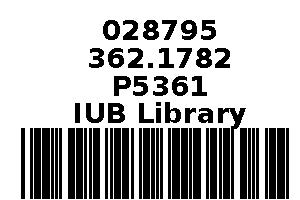
Barcode Layout 1.5x1
Example layout for spine label printing from Koha label printing:
Layout Name: Barcode Layout 1.5x1
Barcode Type (Encoding): Code 39
Layout Type: Bibliographic data precedes barcode
Bibliographic Data to Print:
- Barcode
- Item Call Number
- Branch Notes
Order of Text Fields to Print: Barcode, Item Call Number, Branch Notes
Draw Guide Boxes: Enabled
Split Call Numbers: Not specified
Text Justification: Centered
Font: Helvetica-Bold
Font Size: 10
Oblique Title: Tick
This layout configuration will generate barcode labels with bibliographic data preceding the barcode, including the barcode itself, the item call number, and any branch notes. The labels will be centered, using Helvetica-Bold font with a size of 10. Guide boxes will be drawn to assist with label alignment.
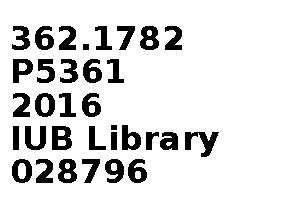
Spine Label Layout 1.5x1
Example layout for spine label printing from Koha label printing:
Layout Name: Spine Layout 1.5x1
Barcode Type (Encoding): Code 39
Layout Type: Only the bibliographic data is printed
Bibliographic Data to Print:
- Item Call Number
- Enumchron
- Branch Notes
- Barcode
Order of Text Fields to Print: Item Call Number, Enumchron, Branch Notes, Barcode
Draw Guide Boxes: Enabled
Split Call Numbers: Not specified
Text Justification: Left
Font: Helvetica-Bold
Font Size: 12
Oblique Title: tick
This layout configuration will generate spine labels with only the bibliographic data printed, including the item call number, enumchron, branch notes, and barcode. The text will be left-justified, using Helvetica-Bold font with a size of 12. Guide boxes will be drawn to assist with label alignment.
Example of spine label and barcode